Four ways to get receipts in
Accepted files are PDF, JPEG and PNG, plus saved emails (.eml) and HTML receipts, up to 25 MB each when uploaded. Telegram allows files up to 20 MB.
- Upload: select Add document on any page, or drag PDFs and photos onto the window. Several files at once are fine.
- Telegram: send a photo or a PDF to the Billfetch bot the moment you are handed a receipt. The bot replies to confirm it arrived.
- Forwarding address: forward invoice emails to your private Billfetch address, or give it to suppliers as their billing email.
- Mailbox: connect Gmail, Outlook or any IMAP mailbox and let Billfetch collect invoice emails and attachments.
How a receipt is read
Text PDFs are read directly. Photos and scanned PDFs go through optical character recognition (OCR) first. A language model then turns the text into structured fields:
- Supplier name, country and VAT number.
- Invoice or receipt number, issue date and due date.
- Currency, net amount, VAT, gross total and VAT rate.
- Line items, each with a suggested category, so a mixed invoice can be split into lines.
- Whether it is an invoice, a receipt, a credit note or a statement.
Checks before anything is approved
Extraction is a suggestion, never a final answer. Before a document reaches you, Billfetch runs plain arithmetic and sanity checks on what was read:
- Net plus VAT must equal the total, within two pence.
- The date must be plausible: not before 2000 and not more than 30 days in the future.
- The currency must be a real currency code.
- The same supplier and invoice number already in your account is flagged as a possible duplicate.
- An invoice and a receipt for the same payment — same supplier, amount and date — are held so the expense is not counted twice.
- Low-confidence reads are marked for review rather than passed through.
A document that fails a check is never approved automatically. Sending the identical file twice is harmless: Billfetch recognises it and tells you it is already in your vault.
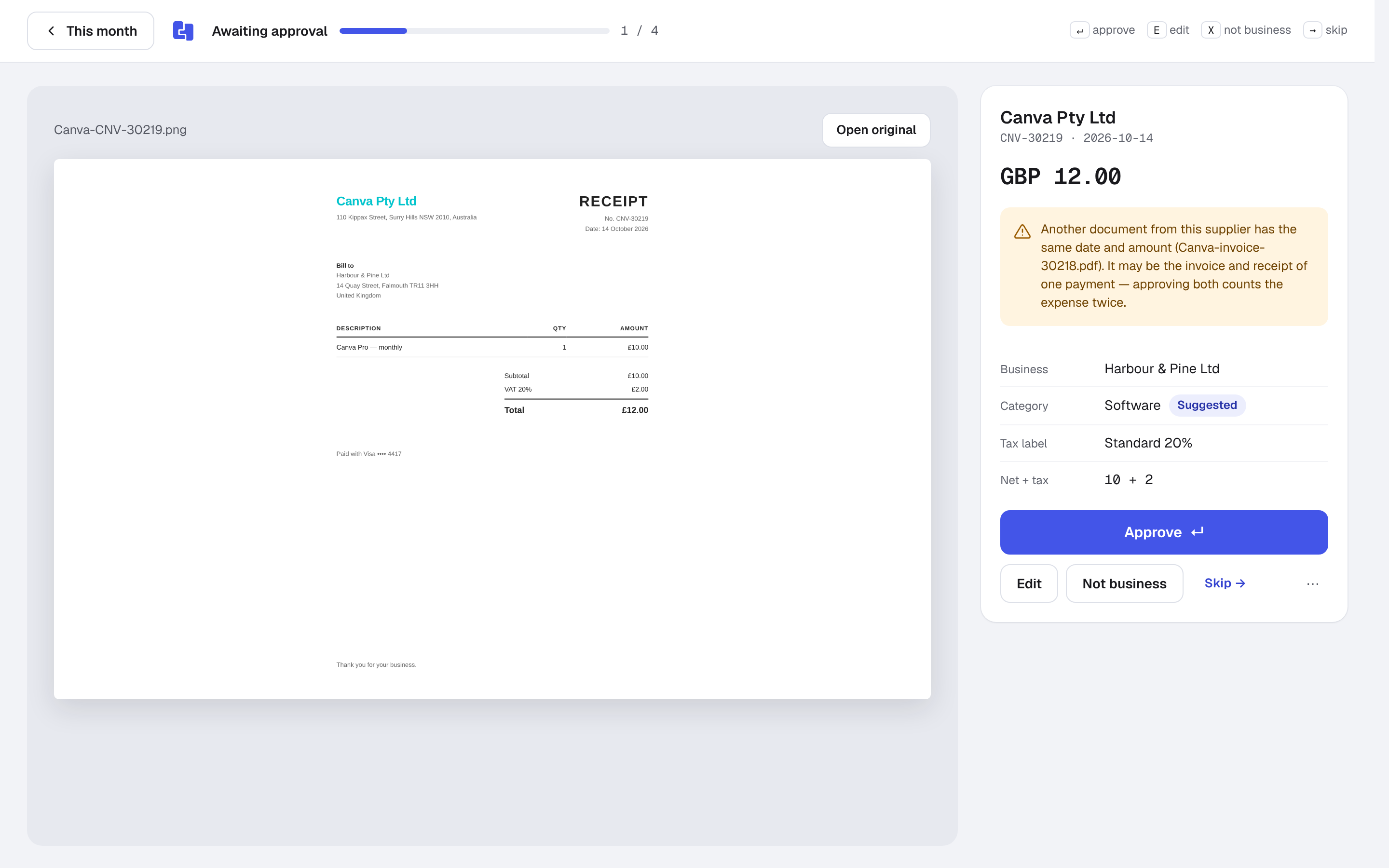
Review in seconds
New documents appear in This month under Awaiting approval. Quick review shows the original beside the suggested supplier, amount and category; approve with a keystroke or correct what is wrong. When you approve the same supplier more than once, Billfetch offers a rule so the next one is categorised for you. Read same payment, two documents for how duplicates are handled.
Matched to the payment it explains
Once approved, a receipt is matched to its bank or card payment by amount, date and supplier name. Payments that still have no document go on the missing list, so you know exactly which receipts to look for. See payment matching for the details.
Made for UK records
Billfetch is built for UK businesses. VAT is read as its own figure with its rate, so VAT-registered businesses can see it per document. Receipts in other currencies are converted with HMRC's monthly exchange rates, with the original amount kept. Each business has its own categories and rules, and your accountant can be given their own account codes for the import files.
Kept as the original, for as long as you need
Every document is stored exactly as it arrived, with a content fingerprint. The accountant package lists each file next to its record in a manifest, so anyone checking your books can trace a figure back to its receipt. For how long UK businesses should keep records, read our record-keeping guide.
Moving from another receipt app
Coming from Dext or AutoEntry? Import your export file and images ZIP and your history comes with you, with the old values as suggestions to review.