Bring in your bank lines
- Direct connections: Wise, Starling and Revolut Business, plus Stripe, PayPal, SumUp, Square, Zettle, GoCardless, Mollie and Airwallex.
- Any other bank or card: upload a CSV statement. Wise, Monzo, Starling, Barclays, Lloyds, NatWest and American Express formats are recognised; for others you map the columns once and save the mapping.
- Overlapping statements are safe: rows already imported into the same account are skipped, and Wise rows are recognised by their Wise ID across CSV and the live connection.
How a payment and a document are paired
For every payment, Billfetch looks for documents that could explain it and scores each candidate on three things:
- Amount: in the same currency it must match to the penny; across currencies the document is converted at the rate for the payment date and may differ by up to 2%, which covers card exchange margins.
- Date: the payment must fall between three days before and fourteen days after the document date, because subscriptions often bill before they charge.
- Supplier: the supplier name is compared with the bank description, and a rule you have approved before counts as a strong signal.
Strong matches are made automatically and can be undone. Weaker ones are offered as suggestions for you to confirm. When you confirm a match, Billfetch can create a rule so similar payments match on their own next time.
Split payments and transfers
Some suppliers, such as advertising platforms, bill a single invoice that is paid in several smaller charges. Billfetch looks for groups of payments that add up to the invoice and suggests them together. Money moving between your own accounts — from Wise to Starling, for example — is recognised as a transfer and left out of income and expenses.
Marketplace payouts reconciled
A payout from Etsy, eBay, Shopify, Stripe or PayPal is a net figure. Billfetch checks that each payout reached your bank, and for Etsy that it equals the sales, fees and refunds behind it. A difference is shown with the lines that cause it; it is never guessed or plugged. See Billfetch for Etsy sellers and for online sellers.
The missing list
Whatever cannot be matched becomes a task in This month, grouped so you can work through it quickly:
- Payments without an invoice: upload the document, pick a possible invoice Billfetch already has, record an expense without an invoice or mark the payment as personal. The payment without an invoice guide covers each option.
- Invoices without a payment: if you paid with a personal card, mark it as paid outside the company account.
- Payouts that do not reconcile, and production costs with no sale to match.
- Sources that have gone quiet, so a broken connection does not look like a quiet month.
Anything still open at month end goes into the accountant package as the missing list. Your accountant sees exactly what is outstanding instead of discovering it later.
Rules that learn from you
Every confirmation teaches Billfetch something. Confirm a match and tick the rule option, and payments with the same bank description match on their own. Record a bank fee as an expense without an invoice and the next one is classified the same way, including ones already waiting. Approve the same supplier twice and Billfetch offers to categorise its documents automatically. Rules stay visible and editable, so nothing happens behind your back.
Every figure traceable
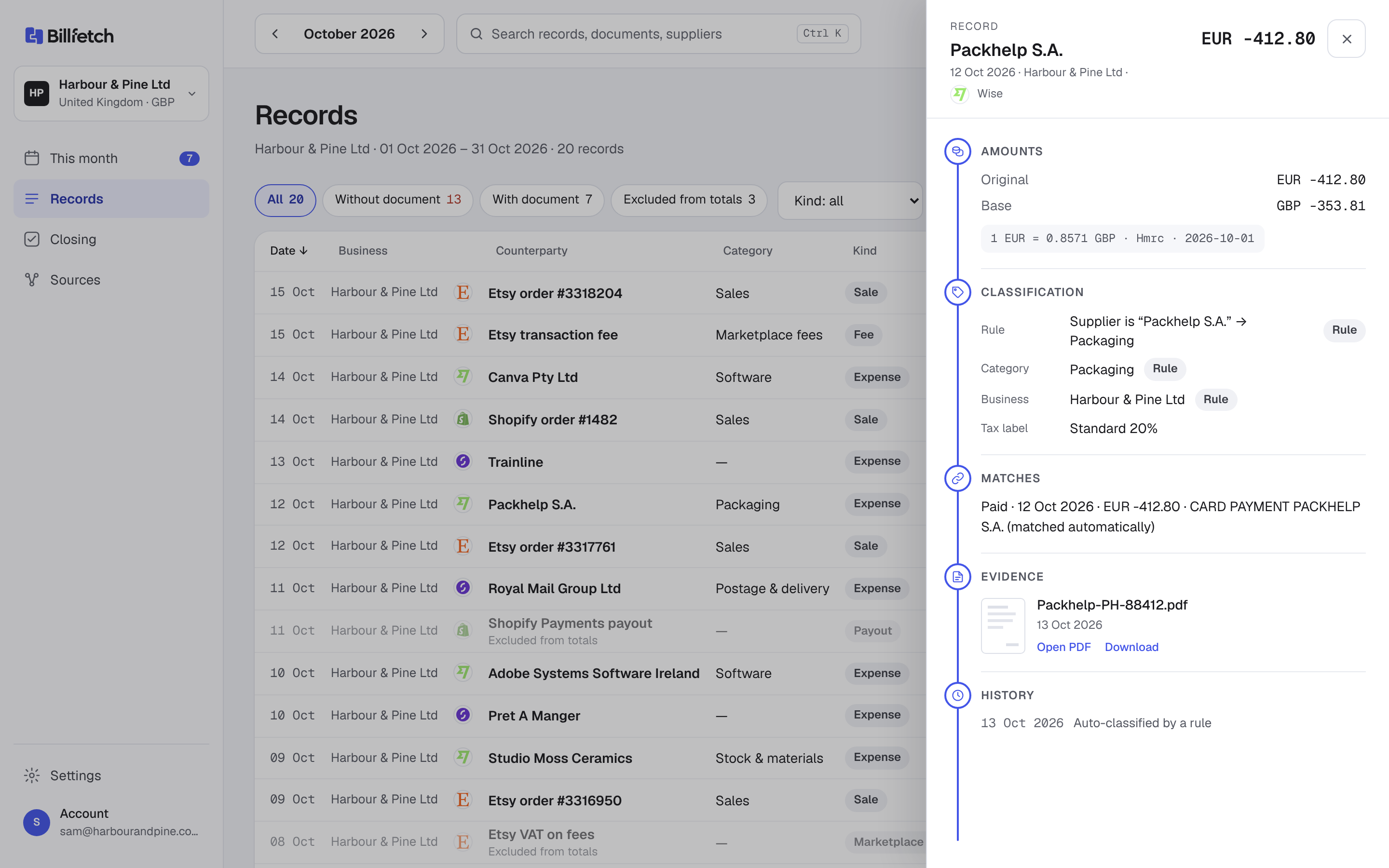
Open any record to see its evidence chain: the bank line, the document, the exchange rate and its source, the match and its history. Amounts in other currencies are converted with HMRC's monthly rates. When the month is clear, the Closing page prepares the accountant package in one click.